Resize or Compress? Compressing Won Every Time
Half-size images scored 14 points lower even at maximum quality. Resizing only pays off when the display shrinks with the file.
"Reduce the resolution instead of the quality" is repeated constantly as compression advice. It is good advice in one situation and actively bad in another, and the two are easy to confuse.
We tested it on 320 photos with a fixed byte budget, and the answer is not a compromise. It is a win for one side and a loss for the other.
The setup
Each image was scaled to 768 px on the long edge, saved as PNG, and used as the reference.
Then three strategies, each given the same 120 KB budget and each allowed to pick whatever quality it needed to fit:
- Full size: 768 px, quality searched downward until it fit.
- Three quarters: 576 px, quality searched upward until it fit.
- Half: 384 px, same search.
All three fit the budget in 320 of 320 cases. Then every result was scaled back up to 768 px and scored against the reference, because the question is what someone sees in a 768 px layout.
What it cost
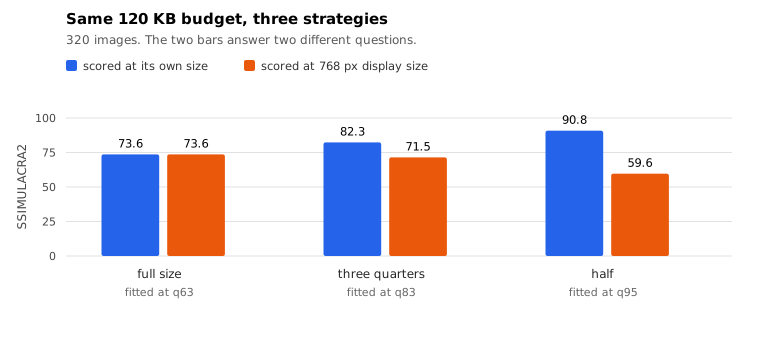
- Full size: score 73.60, and it needed a median quality of 63 to fit.
- Three quarters: score 71.47, needing quality 83.
- Half: score 59.62, needing quality 95, which is the top of most quality sliders.
Half resolution lost 13.98 points and did not win a single image. Three quarters lost 2.13 and won 14 out of 320.
The quality numbers are the part that makes this concrete. To fit the same budget, the 576 px version had to be saved at quality 83 and the 768 px version at 63. You are paying twenty quality points for a resolution reduction that still measures worse.
Half resolution has a harder limit: it needed quality 95, the maximum, and still only averaged 108.6 KB. There is no quality setting left to reach for. Once those pixels are gone, no encoder can buy them back.
But the other half of the story
Those numbers are what you get if the file is displayed at 768 px. If it is not, everything changes.
Scored at its own size, meaning the 384 px file compared against the original downscaled to 384 px, the three results came out:
- Full size: 73.60
- Three quarters: 82.31
- Half: 90.81
The half-size file is the best of the three by a wide margin, because it was never asked to reproduce detail it does not have. A 384 px image displayed at 384 px is not losing anything to the resize. It is losing only what the 120 KB budget forced.
The decision rule
There is exactly one question that matters: Does the size it will be displayed at shrink along with the file?
- Yes (a responsive layout, a thumbnail grid, a phone screen, an email where the image will be scaled down anyway). Resize. The bytes you save are genuinely free, and the result is better at its real display size.
- No (a form that wants "high quality", a print target, a full-width hero where the CSS keeps it at the original size). Do not resize. Lower the quality instead. It won 320 out of 320.
The trap is resizing "to save bytes" while the layout still stretches the image back to the original width. That is the exact combination measured above, and it is the worst option available: 14 points gone and the file is barely smaller.
A practical version
If you are running a site, the sequence is: 1. Decide the largest size the image will ever be displayed at. Not the size of the source file. 2. Export at that width, or one step above for high-density screens. 3. Then use the quality slider for whatever budget remains.
Doing it in that order means every resize is a real saving and no quality is spent re-buying detail that could not have been displayed anyway. Doing it in the other order, resize first and stretch later, is what these numbers are measuring.
Caveats
Pillow's libjpeg, not this site's encoders. The absolute scores would shift with a different encoder, but the direction of the result follows from how lossy compression works, not from the implementation.
A 120 KB budget at 768 px is a fairly generous target, which is why the full-size version only needed quality 63. A tighter budget would force the full-size version down to lower quality and narrow the gap, though the half-size version would also be squeezed and cannot go above 95.
The scores assume a 768 px display. Everything here is about matching the file to the display, and the display is the input you have to supply yourself.
320 images, one collection, upscaling done with LANCZOS. A different upscaler would move the upscaled numbers slightly.
Reproducing it
tools/measure-resize-vs-quality.py. It needs Pillow and ssimulacra2 on the path, takes a directory and a byte budget, and writes both scoring bases to JSON. About thirteen minutes for 320 images.
The per-image numbers are downloadable. If your own images behave differently, the about page has the address, and all nine of our measurements are collected on one summary page.