Metadata Is 12% of the Average JPEG and 88% of the Worst
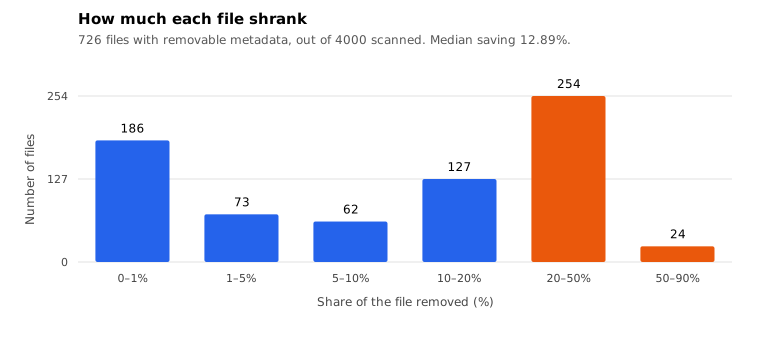
Across 4,000 real JPEGs, 726 carried removable metadata. The median saving was 857 bytes, but 24 files lost over half their size. Every pixel stayed identical.
"Strip the metadata to save space" is advice nobody quantifies. We stripped 4,000 real JPEG files from a downloads folder with a byte-level segment walk, then decoded before and after and compared every pixel.
The short version: it saved a median of 857 bytes, it never changed a single pixel, and it occasionally removed 88% of a file. It also taught us two things about how this goes wrong.
What was there
Of 4,000 files, 726 had at least one removable segment. The rest had nothing worth taking, which is itself worth knowing: most JPEGs on the open web have already been through something that stripped them.
- APP1 in 699 files. This is EXIF and XMP: the camera data, the timestamps, the editing history.
- APP12 in 368 files. Photoshop's "Ducky" segment, which holds a save-for-web flag and little else.
- APP13 in 51 files. IPTC, the captioning and copyright block.
- APP11 in 14 files. JUMBF, the container used by C2PA content credentials.
- COM in 2 files. Free-text comments.
Every one of those is metadata by definition. None of them is image data.
What it saves
- Mean saving 19.29%, median 12.89%
- Mean file size 115.7 KB down to 111.4 KB
- Median saving per file: 857 bytes
- 405 files saved more than 10%
- 24 files saved more than 50%
- Worst case: 88.11%
- 186 files saved less than 1%
That distribution is the whole point. The mean and the median disagree because the tail is enormous. For most images, stripping metadata is a rounding error you will never notice. For a handful, it is the difference between a file that will not upload and one that will.
The 857-byte median is smaller than most people expect, because the common mental model is "EXIF is huge". It usually is not. What is huge is a small number of specific outliers: a thumbnail JPEG embedded in APP1, an editing history, a 2 MB colour profile.
It never changed a pixel
All 726 files decoded to byte-identical RGBA before and after. That is expected, since a segment walk copies the entropy-coded data untouched, but we checked rather than assumed, in every file.
So the common objection, that stripping metadata damages the image, is simply false for this method. It is false for jpegtran's -copy none too, which does the same thing.
It is not false for "strip metadata" features that re-encode. Those are two operations wearing one label, and the damage comes from the re-encode.
Trap one: the colour profile
Our first version of the tool stripped every APPn segment. That included APP2, which is the ICC colour profile.
21 of the 726 files had one. Removing it, in every case, produced a file whose decoded pixels were byte-identical and whose colours would look different in any colour-managed viewer, because the profile that says how to interpret those numbers was gone.
The pixel test cannot catch this. Our test passed on all 21. If we had shipped that version, the tool would have been quietly wrong about colour while every check it ran said fine.
The fix is to keep APP2, along with APP0 (JFIF) and APP14 (Adobe's colour transform flag, which matters for CMYK). What that costs: the 21 files keep their profiles, and the aggregate saving drops from 19.6% to 19.29%. Under a third of a percentage point, in exchange for not silently changing what colour the image is.
Trap two: provenance
14 files carried APP11, which in 2026 increasingly means a C2PA manifest: a cryptographic record of where the image came from and what was done to it.
Stripping it is not a privacy win in the way removing GPS coordinates is. It removes the evidence that the image is authentic. If you are publishing a photo whose provenance matters, stripping APP11 is the equivalent of scrubbing the signature off a document.
We do not have a strong recommendation here beyond awareness. It is a new enough segment that most stripping tools predate it, and if your tool removes it silently, it is removing something you may not want removed.
What to do
- If the goal is a smaller file, stripping metadata is worth doing but will usually save less than a kilobyte. Re-encoding at a lower quality is what actually moves the number, and it does cost quality.
- If the goal is privacy, strip APP1 and APP13. That removes the camera data, the timestamps and the captions, which is what the concerns are actually about.
- Do not strip APP2 unless you know the image has no colour profile that matters, or you are converting to sRGB deliberately.
- Do not strip APP11 blindly if the image's provenance is part of its value.
- Use a tool that does a segment walk, not one that re-encodes. Verify afterwards that the pixels are unchanged rather than trusting the label.
Caveats
One folder, one machine, 4,000 files of which 726 were candidates. A collection of camera originals would look different, because those carry much more EXIF than files that have been through a web pipeline.
The strip is a marker walk over JFIF and Adobe JPEGs. Rarer variants (JPEG-LS, 12-bit, arithmetic coding) were not tested.
Savings depend entirely on what was put in. A file with no metadata saves nothing, and 186 of ours saved less than a percent.
Reproducing it
tools/measure-metadata-strip.py. It needs Pillow for the pixel check and nothing else. It takes a directory, walks it, and writes per-file numbers to JSON including which segments it removed from each file.
The raw data is downloadable. If your own folder behaves differently, the about page has the address, and all eight of our measurements are collected on one summary page.