How Few Colours Does Your PNG Actually Need?
On 181 real PNGs, dropping to 256 colours cut files by 56 to 79 percent and cost 10 to 15 points. The game assets were already palettised and gained nothing.
PNG is lossless, so people assume it has to be big. It does not have to be. A PNG can store either full 24-bit colour or a palette of up to 256 entries, and for the right kind of image the palette version is a fifth of the size.
So which kind of image is this good for? That turned out to be measurable. We measured 181 real PNGs from five folders and the answer is more useful than "it depends".
What we did
We loaded each file, capped its longest side at 512 px, and saved that as the reference PNG. Then the same image was reduced to 256, 128, 64, 32 and 16 colours with dithering switched off, saved as PNG again, and scored against the reference.
We recorded each file's actual colour count first, because that turns out to be the only number you need.
The quantiser is Pillow's median cut, not libimagequant, which is what pngquant and this site use. So these are the costs of palette reduction as a technique, not the behaviour of one specific tool.
The files we had
| Folder | Files | Median colours | Median size |
|---|---|---|---|
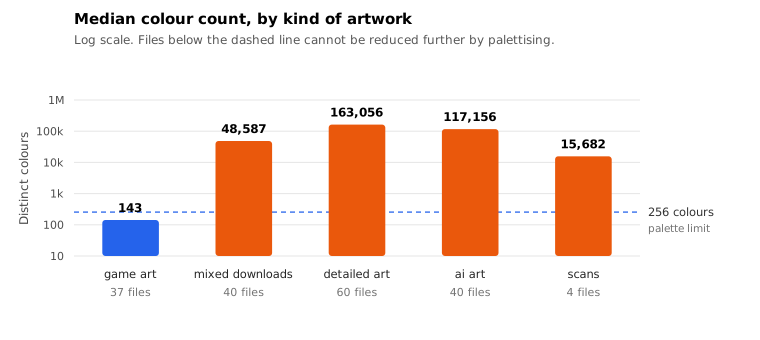
| Game assets | 37 | 143 | 2.7 KB |
| Mixed downloads | 40 | 48,587 | 213 KB |
| Detailed artwork | 60 | 163,056 | 577 KB |
| AI artwork | 40 | 117,156 | 449 KB |
| Scans | 4 | 15,682 | 156 KB |
Look at the first row. Every one of the 37 game assets was already under 256 colours, with a median of 143. They had been palette-encoded before we got them, which is what every game engine and asset pipeline does automatically.
Reduce those to 256 colours and nothing happens. They are already there, so there is nothing left to remove.
What it costs on everything else
At 256 colours, averaged across each folder:
| Folder | Size change | Score |
|---|---|---|
| Scans | −51.4% | 82.46 |
| Mixed downloads | −56.1% | 63.99 |
| AI artwork | −63.6% | 64.74 |
| Detailed artwork | −78.7% | 72.96 |
Every folder won big on size, between half and four fifths of the file. The quality cost is also real everywhere, and it is not evenly distributed: the scans survive 256 colours with a score in the low eighties, while AI artwork drops to 64.
Going further is worse in a way that accelerates. At 64 colours the detailed artwork is down to 49.48. At 16 colours it is 13.96, which is not a degraded image, it is a different image.
The only number you need
Before you reach for the colours slider, count the colours in your file. Three cases:
- Under 256. You are already using a palette. The slider does nothing. This covers most game assets, most icons, and most PNGs that came out of an optimiser.
- A few thousand to about 20,000. This is the sweet spot for palette reduction. Scans, flat-design graphics, and screenshots live here, and they often survive 256 colours with a score in the eighties.
- Above about 50,000. You have a photographic or painted image stored as PNG. Palette reduction will remove half to four fifths of the bytes and 10 to 15 points of quality. If that trade is acceptable, do it. If not, PNG is the wrong format for this image and you should be looking at JPEG.
What palette reduction is actually for
The case it is designed for is a flat-design graphic exported as a 24-bit PNG: a logo with a handful of brand colours, a UI mockup, a chart with six fills. Those files run to a few hundred KB of 24-bit data that describes maybe 40 distinct colours, and palettising them is close to free visually.
We did not have that class in our sample. Our PNG collection skewed towards either already-palettised game assets or photographic artwork, with almost nothing in between.
Which is worth saying plainly: we did not find the case this feature is best at, so we cannot put a number on it. What we can say is what the other two cases cost.
Caveats
Pillow's median cut, no dithering. A better quantiser, or dithering turned on, would shift the numbers. Dithering in particular trades banding for noise, which helps on gradients and hurts the compression ratio.
Only four scans made it into the sample, which is enough to say they behaved differently and not enough to be precise.
We capped every image at 512 px on the long side. Larger images carry more detail and generally quantise worse.
Colour counts come from a downsampled version of the image when it exceeds 400,000 pixels, so a large image may report slightly fewer colours than it contains. The three-band rule above has wide margins, so this does not affect the guidance.
Reproducing it
tools/measure-png-colors.py. It needs Pillow for the quantising and ssimulacra2 on the path for the scores. It takes about eight minutes for 181 images.
Download the per-file numbers: the colour count and the size at every level. If your own images behave differently, the about page has the address, and all ten of our measurements are collected on one summary page.